

CapCut Review: The Viral King with a Privacy Catch
If you have spent any time on TikTok, you have seen CapCut in action. This mobile-first video editor, from TikTok's parent company ByteDance, has become the dominant tool for short-form social video.
It is known for its incredibly powerful free version, massive library of trending effects, and an intuitive interface that anyone can learn. For casual creators and influencers, CapCut is exceptional—offering robust timeline editing, keyframing, and a suite of powerful AI tools that many competitors charge for.
However, as of 2025, the platform has introduced aggressive monetization and controversial Terms of Service updates that every professional needs to know about.
The Workflow: Mobile-First Speed
CapCut is purpose-built for one thing: creating social media videos, fast.
The Interface: Its primary strength is the intuitive mobile UI. AI tools are reduced to simple buttons (e.g., "Remove background"), making complex edits incredibly straightforward.
Cross-Platform: You can start a project on your phone and continue it on the desktop or web app, though feature parity varies (see below).
The AI Toolkit (Competitive List)
CapCut offers a staggering list of "smart" tools:
Auto Captions: Industry-leading accuracy with multi-language support.
Transcript-Based Editing: A pro-level feature (like Descript) that lets you edit video by deleting text from the transcript.
AI Avatars (OmniHuman): Powered by ByteDance's OmniHuman research, this creates lifelike virtual presenters from single images or audio tracks.
Video Translator: Translates your video into multiple languages, including AI-powered lip-sync to match the new audio.
AI Dubbing: Retains the original speaker's tone and cadence while translating audio.
Smart Tools: Includes Video Upscaler (genuinely improves blurry footage), Voice Isolation (removes noise), and Auto Reframe (converts horizontal video to vertical).
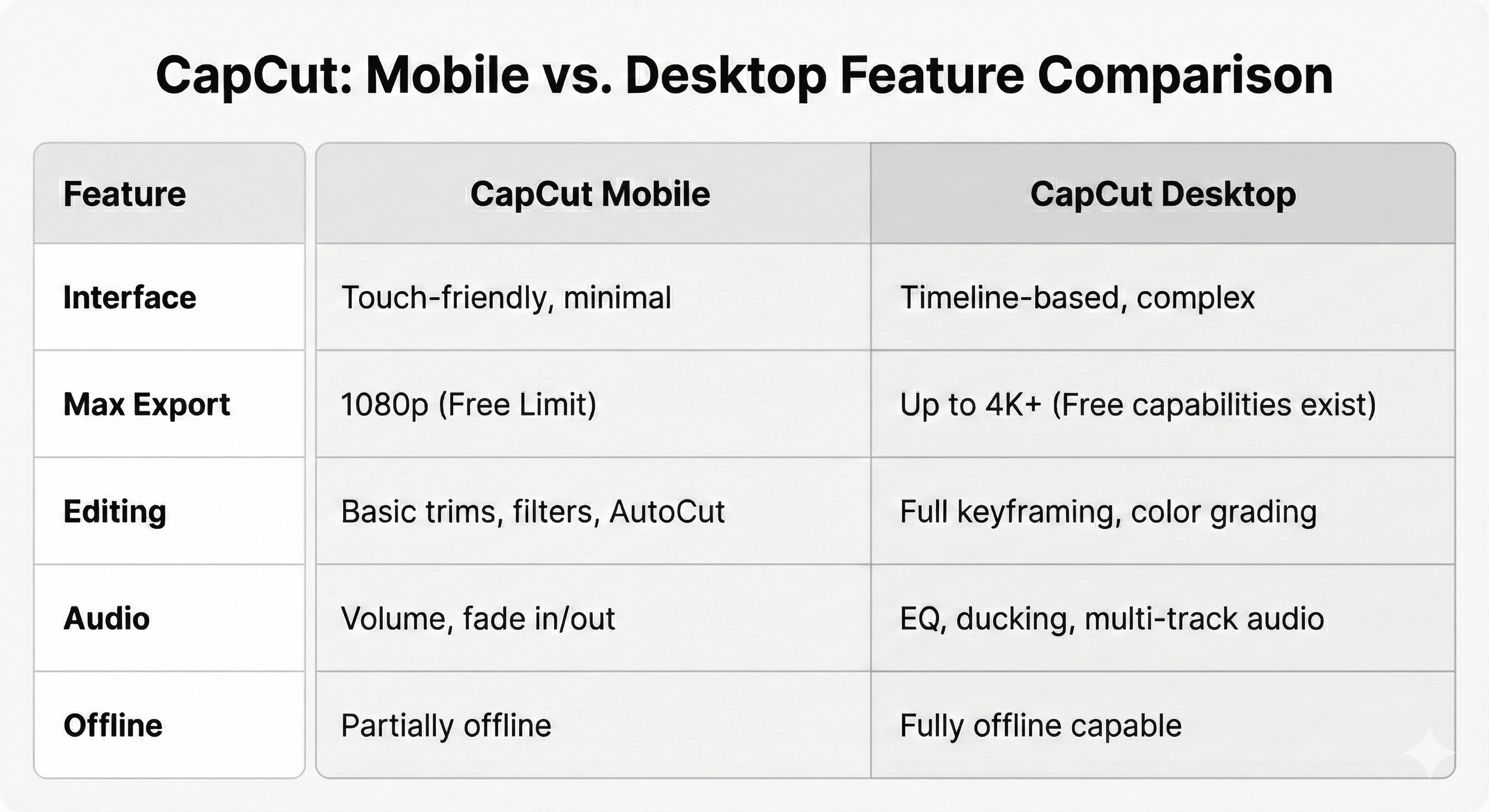
Technical Specs: Mobile vs. Desktop
There is a distinct gap between the versions:
Pros & Cons: The Honest Truth
✅ The Strengths
Best-in-Class Free Tier: It is, without a doubt, the most full-featured free video editor on the market for social content.
Extremely Easy to Use: There is almost no learning curve.
Always on Trend: It is synced with TikTok, meaning you have instant access to the latest viral effects, filters, and fonts.
Powerful AI: Features like the Video Upscaler and Transcript-Based Editing are genuinely impressive for a free/cheap tool.
❌ The Weaknesses
Aggressive Monetization: Users frequently report that features that were previously free are now moved behind the "Pro" subscription.
Slow Exports: The app struggles with longer videos. Exporting a 10+ minute video can take a long time.
Watermarks: Some free templates and effects will add a CapCut logo to your final video.
Data Sovereignty: Owned by ByteDance, raising concerns for corporate users (see below).
Legal, Licensing & Privacy
Content Ownership (The Catch): While you technically own the videos you create, uploading them grants CapCut an extensive, irreversible license. The 2025 Terms of Service explicitly state that they can use, modify, distribute, and even sell your content without additional permission or payment. This license covers everything—including unpublished drafts and deleted content.
Commercial Use: Commercial use of your generated videos is generally allowed. However, be aware that because of the broad license you grant CapCut, they could potentially reuse your commercial content elsewhere.
Privacy: CapCut is owned by ByteDance. If you are working on sensitive, unreleased client IP, uploading it to their cloud presents a significant data privacy risk.
Verdict
CapCut is the undisputed king of short-form video. For influencers and beginners, it is the best tool available.
However, if you are a professional agency working with sensitive client IP, the 2025 Terms of Service should make you pause. Do not upload confidential client drafts to CapCut's cloud.